Until now, Pyxsoft Anti Malware and pxShield were cPanel products, plus a version for servers with no panel. Starting today, both run on DirectAdmin too, each with its own plugin and the same dashboard you would see in WHM.
One command installs either of them, and on a DirectAdmin server the installer picks the DirectAdmin packages by itself.
Install
Run it as root:
# Anti Malware and pxShield together
curl -s https://www.pyxsoft.com/install-suite | bash

# Or only one of them
curl -s https://www.pyxsoft.com/install-anti-malware | bash
curl -s https://www.pyxsoft.com/install-pxshield | bash
Then sign in to DirectAdmin as an administrator and open Extra Features. Both products come with a 7-day free trial, no credit card needed. The same command upgrades an existing installation later.
Anti Malware in DirectAdmin
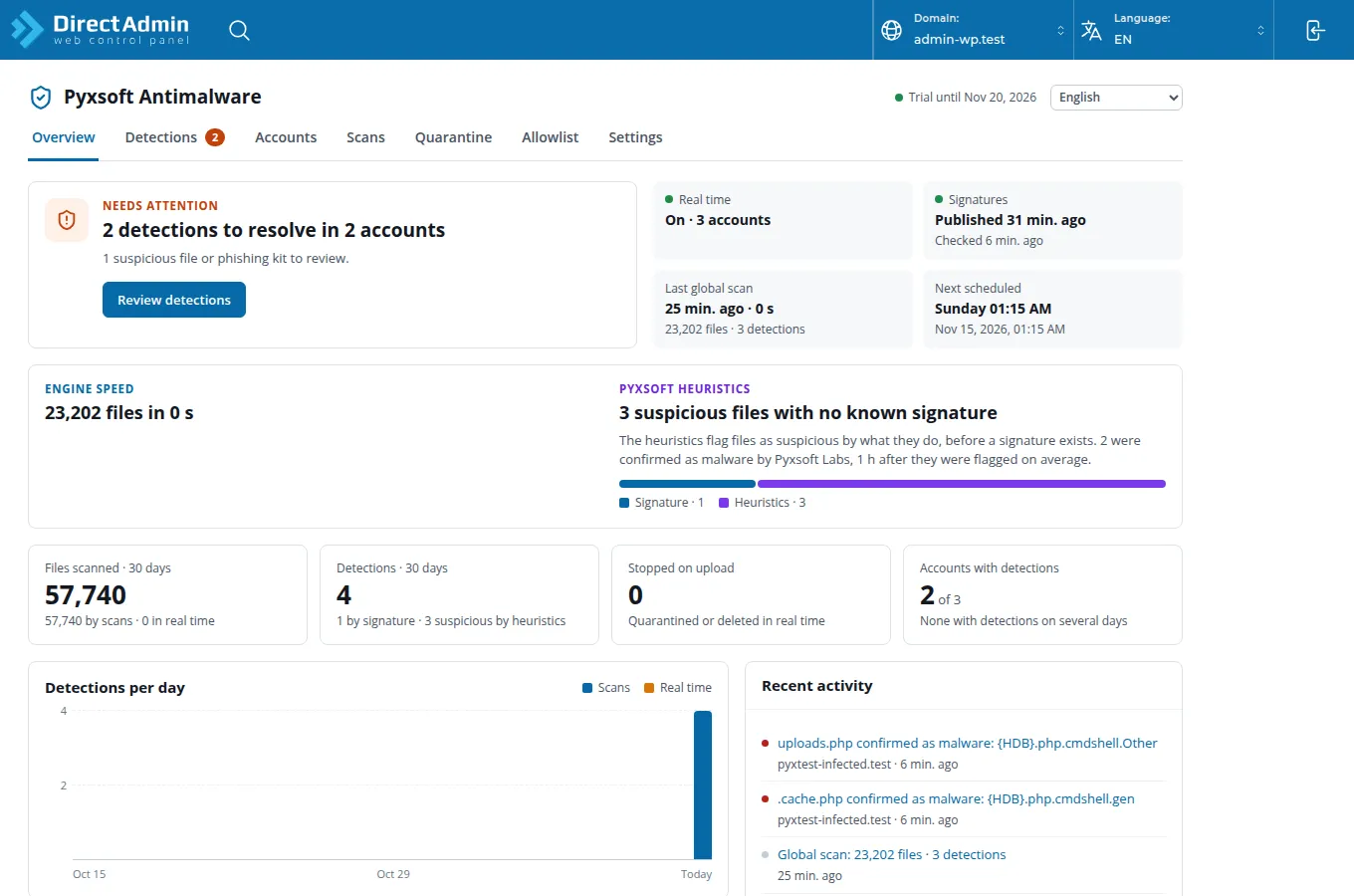
The plugin is the full Anti Malware dashboard: overview, detections, accounts, scans, quarantine, allowlist and settings. Everything works as it does on cPanel: real-time scanning, scheduled scans, the quarantine, and the cleaner that removes injected code from WordPress files without deleting the files.
Accounts are DirectAdmin users. Anti Malware reads them from DirectAdmin, with each user’s domains, subdomains and domain pointers, so a detection shows up under the customer it belongs to. Sites that the web server serves but DirectAdmin does not manage, such as /var/www/html, appear as accounts of their own.
Alerts reach you without touching Exim. DirectAdmin’s mail server only relays mail to its own domains, so Anti Malware doesn’t send its alerts through it. They go out from alerts@pyxsoft.com instead, to an address you confirm once. You don’t have to set up SMTP or open the relay.
The pyxsoft command and its full-screen interface are installed as well, if you prefer SSH.
pxShield in DirectAdmin
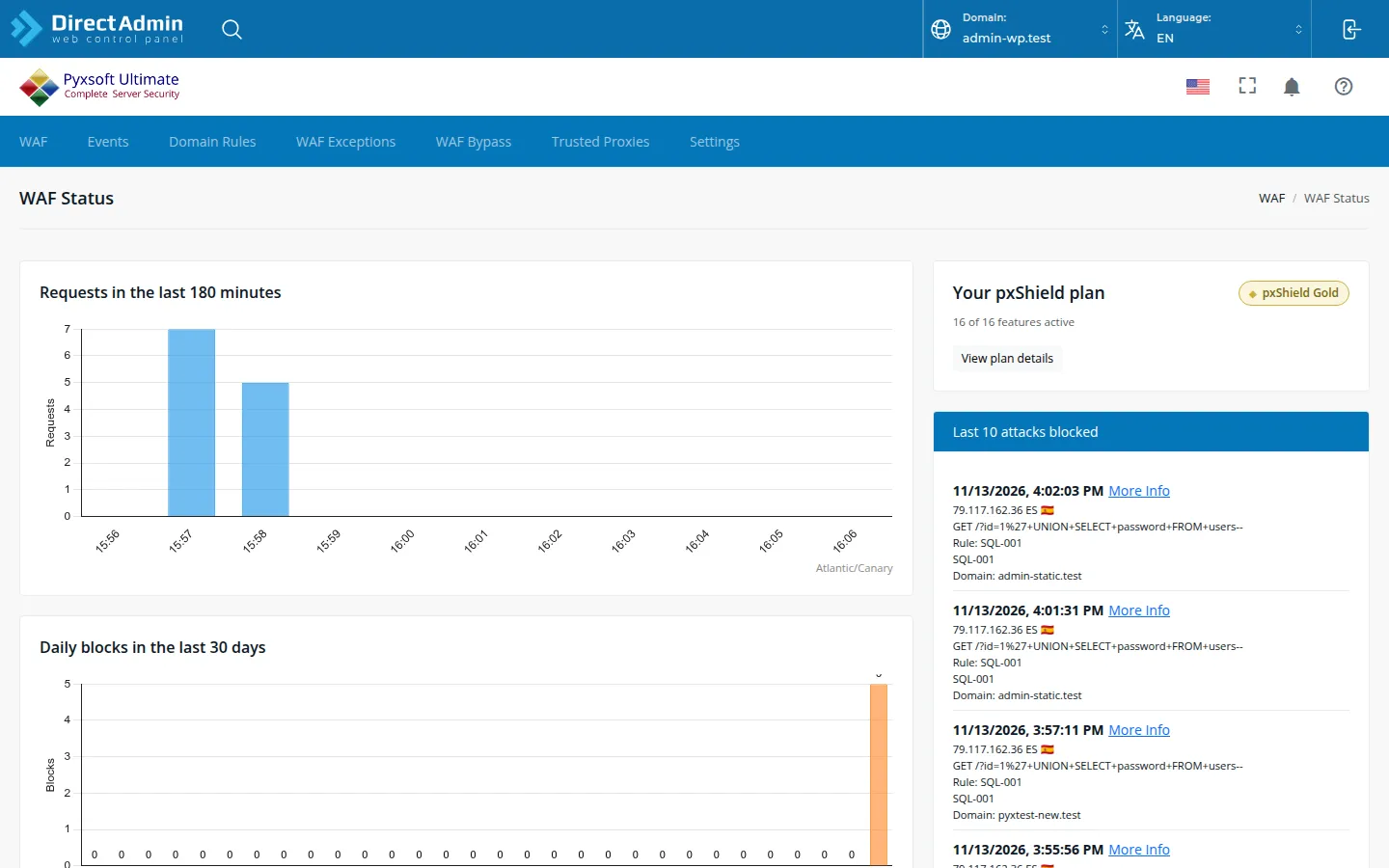
pxShield is a web application firewall that sits in front of the web server: it blocks SQL injection, web shells, brute force against WordPress logins and malicious bots before Apache or nginx ever sees the request. The DirectAdmin plugin has the same pages as in WHM: blocked attacks, the event log, per-domain rules, exceptions, bypass IPs, trusted proxies and settings.
Three things had to be done properly on DirectAdmin:
- Every CustomBuild web server. We tested Apache, nginx, nginx + Apache, LiteSpeed Enterprise and OpenLiteSpeed with domains, subdomains, HTTPS, webmail, blocking and the visitor’s real address. If you switch web servers later with
./build set webserver, pxShield sets up the new one within five minutes. - The sites come from DirectAdmin. pxShield reads the domains, subdomains and pointers of every user from DirectAdmin’s own data, and uses the certificate DirectAdmin installed for each one, Let’s Encrypt included. When a user adds a domain, DirectAdmin reloads the web server and pxShield picks the change up in the same second.
- csf keeps working. Most DirectAdmin servers run csf. pxShield adds its ports to
csf.confand one line to csf’s post script, socsf -rdoesn’t undo the redirection. If you already had a post script, your lines stay where they are.
Your logs, .htaccess rules and PHP keep seeing the visitor’s IP address, not the server’s. pxShield adds one include file for Apache or nginx, and CustomBuild keeps it when it rewrites the configuration. The DirectAdmin page of the pxShield docs lists every file it touches, and uninstalling removes them again.
What isn’t there yet
Both plugins are for administrators only. Your DirectAdmin users don’t get their own pxShield or Anti Malware page yet, as cPanel users do with pxShield. The free Pyxsoft Firewall is still cPanel-only.
Pricing
The price is the same as on cPanel: a flat price per server, however many accounts or domains it hosts. See pricing.
If you run DirectAdmin servers, start the trial on one of them. If anything doesn’t behave as described here, tell us: DirectAdmin setups vary a lot, and we would rather hear about yours.
Documentation: Anti Malware on DirectAdmin · pxShield on DirectAdmin · Getting started