Years ago we wrote about the c99 shell, the web shell everyone recognized. c99 is mostly a museum piece now: it is huge, loud and detected by every scanner. The shell you actually find today when you open a compromised cPanel account is its quieter successor, WSO — “Web Shell by oRb” — almost always living under the name FilesMan in its own code.
This is a look at what WSO is, what an attacker does with it, why it is so hard to spot in a file listing, and how to find it on your server.
What a web shell is
A web shell is a script an attacker uploads to a server to control it through the browser. Once it is in place, they don’t need your FTP password or SSH: they just open a URL. From that page they can read and write files, run commands, reach the database and pivot deeper into the machine, all as the user the web server runs as. On shared hosting that is usually the cPanel account, which is all an attacker needs to deface the sites, send spam, inject redirects or plant more backdoors.
WSO is the most common of them on PHP hosting. It is small, it is a single file, and it has been copied, renamed and re-obfuscated thousands of times. The sample in the screenshots below is a real one: a modified WSO 2.5 we pulled out of a WordPress site, where it was hiding as wp-content/uploads/2026/11/admin.php.
One screen, full control
WSO greets whoever opens it with a compact dashboard. The header alone is a reconnaissance report:
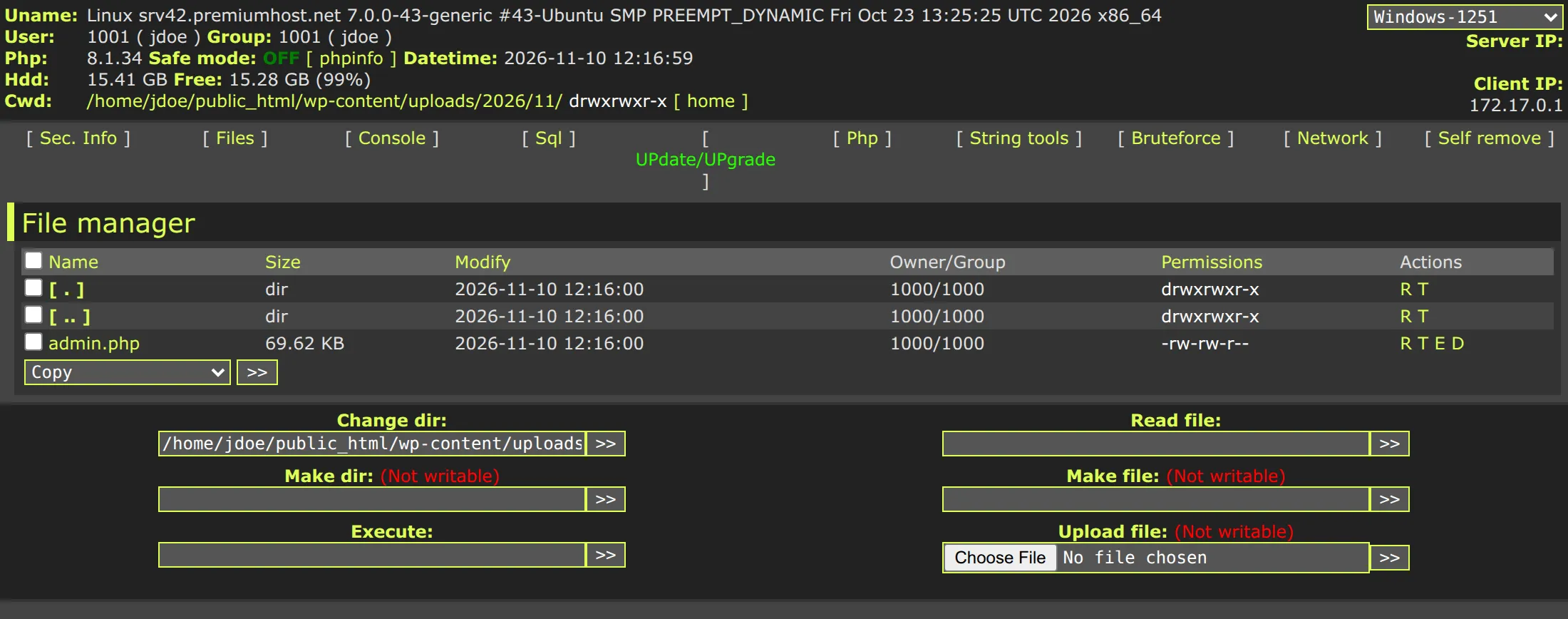
In those first lines the attacker already learns the kernel and distribution, the user and group the shell runs as (jdoe), the PHP version, whether safe_mode is off, how much disk is free, and the full path to the current directory. The row of links below — Sec. Info, Files, Console, Sql, Php, String tools, Bruteforce, Network, Self remove — is the whole toolkit.
The file manager is the part you see first. It lists every file with its size, modification date, owner and permissions, and each row has single-letter actions: Read, Touch (change the timestamp), Edit and Delete. The boxes at the bottom let the attacker change directory, read or create any file, run a shell command and upload more files. Touching timestamps matters: by resetting a file’s modification date to match its neighbours, the attacker hides which files they changed, so “sort by date to find what was touched” stops working.
A command line in the browser
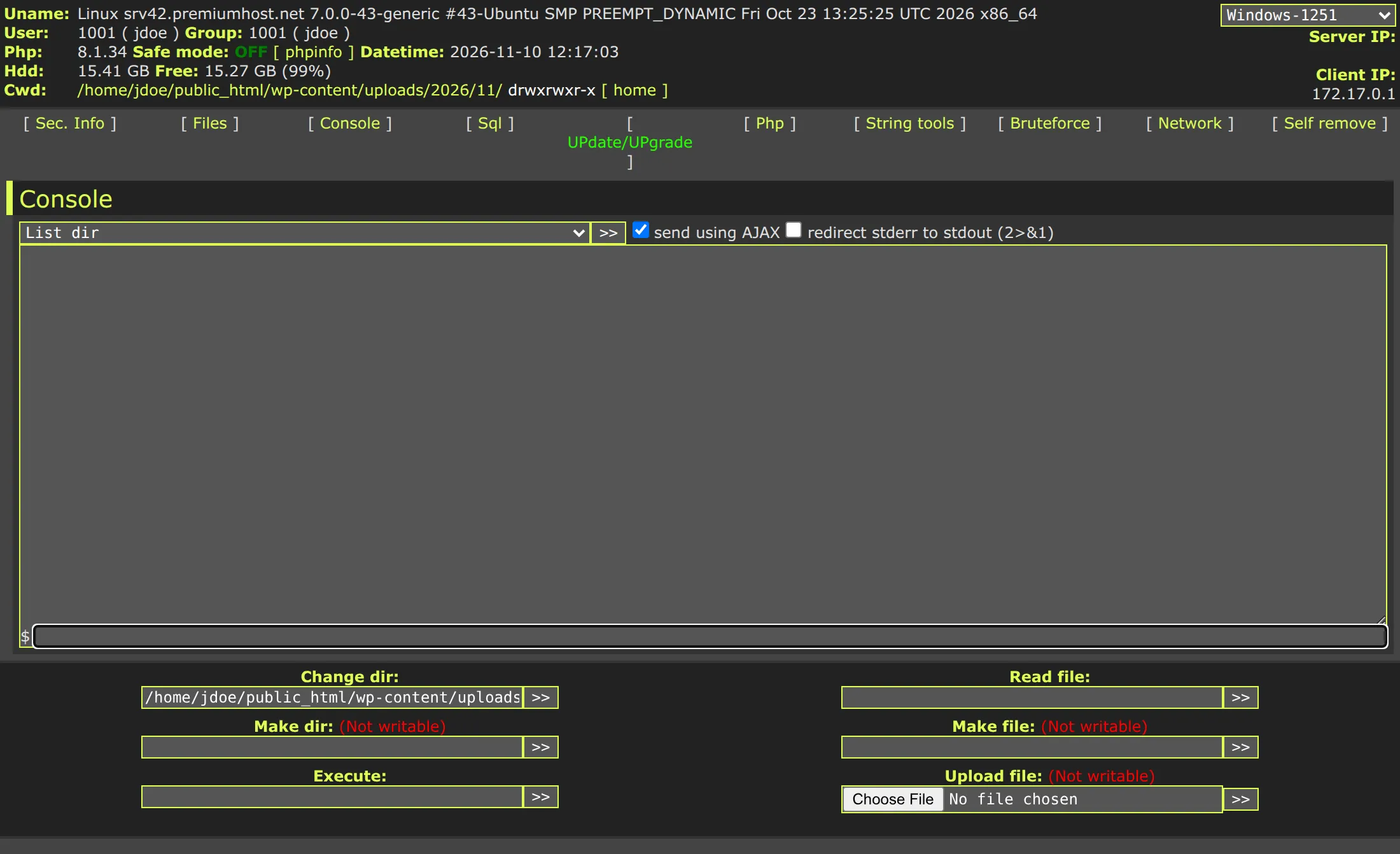
The Console tab is a terminal. Commands are sent over AJAX and the output comes back in the page, so the attacker gets an interactive shell without ever opening a port.
Password guessing, built in
The Bruteforce tab turns the hacked site into an attack platform against its neighbours. It can hammer FTP or MySQL, either walking every user in /etc/passwd (optionally trying the username reversed as the password — an old but still productive trick) or running through a dictionary file.
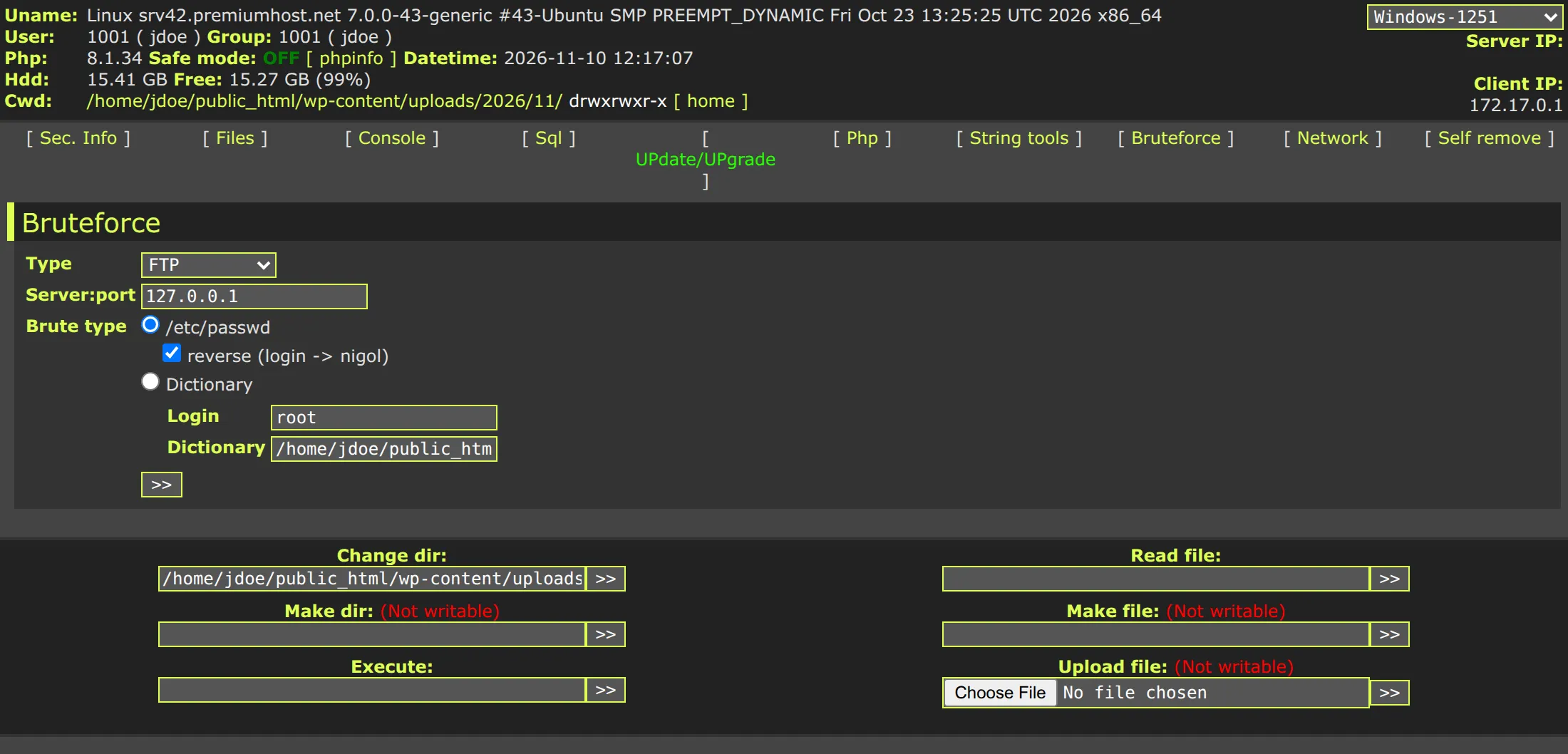
On a shared server where /etc/passwd lists every account, this is how one compromised site becomes ten.
A way out to the attacker
The Network tab provides the reverse shell. It can bind /bin/sh to a port with Perl, or “back-connect”: the server reaches out to the attacker’s machine and hands them a shell, which sails straight through most outbound firewalls.
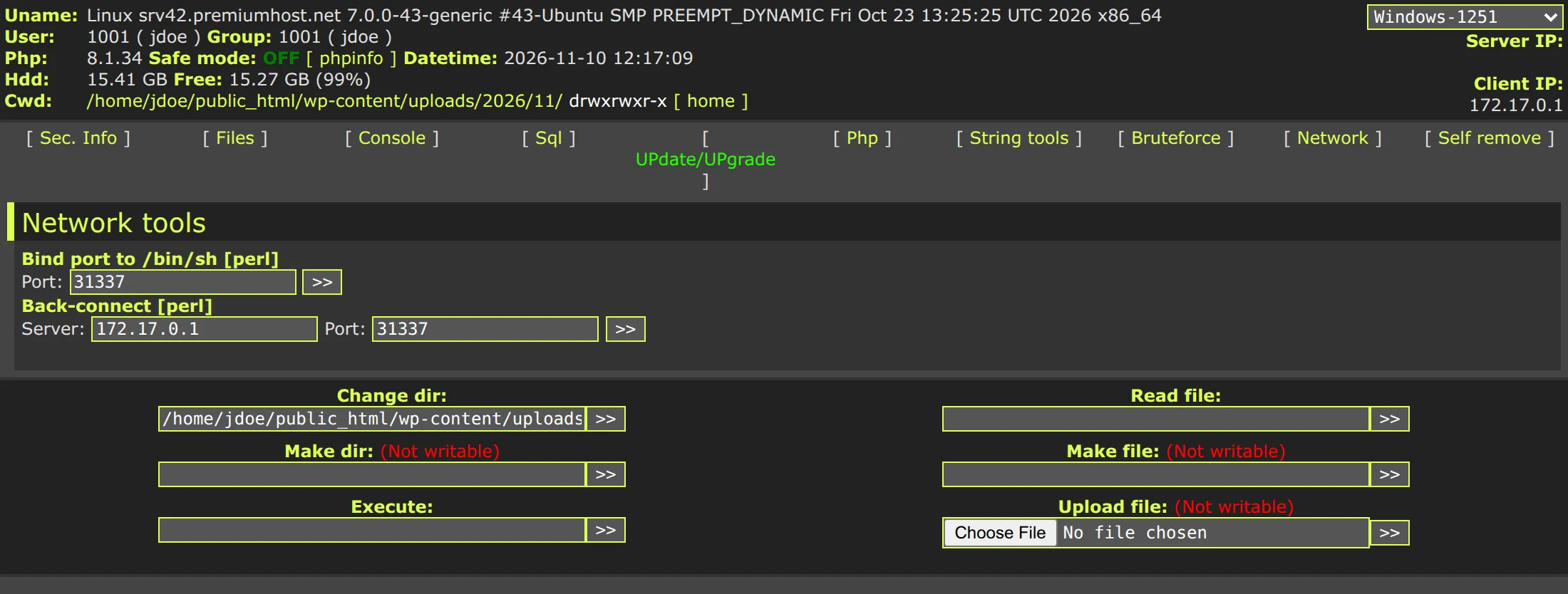
There is more behind the other tabs — Sql for browsing the database, Php for running arbitrary code through eval, String tools for encoding and hashing, and Self remove to delete the shell and erase the obvious evidence when the attacker is done.
Why it is so hard to find
WSO survives because it is built to be invisible, in three ways.
It hides in plain sight. Our sample was called admin.php and sat four folders deep inside wp-content/uploads — a directory full of legitimately-written files that nobody audits. Common names are admin.php, wp-admin.php, radio.php, up.php or a random string. In a listing of hundreds of uploaded files, one more PHP file does not stand out.
It is obfuscated. The file on disk is not readable code. Like the sample here, most WSO copies store their real body as compressed, encoded data and rebuild it at runtime with layers of gzinflate, base64_decode, str_rot13 and str_replace. Every copy is packed a little differently, so each one has a different hash and a scanner that only knows hashes catches exactly one. This is the same polymorphism we covered recently — and WSO was one of the families in that very campaign.
It lies to search engines. Many WSO builds, including this one, return “404 Not Found” to the Google, Yahoo, MSN and Yandex crawlers. The shell keeps working for the attacker but never gets indexed, so the site is never flagged as hacked in search results and the owner gets no warning from Google Search Console.
How Pyxsoft detects it
A hash list or a search for eval( is not enough here: the hash is unique to each copy, and plenty of legitimate code uses eval. What gives WSO away is not any single string but what the code does.
The static analyzer in Pyxsoft Anti Malware parses the PHP and follows the data through it, without running anything. In a file like this it sees the decoder being assembled from string fragments, the encoded body stored inside the file, the chain of gzinflate/base64_decode/str_rot13 applied layer by layer, and the result handed to code execution. That pattern — hiding the names of the decoding functions, decoding in several layers, and running the output — is what a dropper or a packed shell looks like, and almost nothing legitimate does all of it at once. So it is flagged whether the copy is called admin.php or radio.php, and whatever order the decoders run in.
The analyzer doesn’t need to have seen this exact file before, which is the whole point against a family that repacks itself on every copy.
What to check on your server
- Look for PHP where PHP shouldn’t be.
wp-content/uploadsis for images and documents, never code:
Nearly anything this finds is suspicious.find /home/*/public_html/wp-content/uploads -name '*.php' - Search for the telltale structure, not fixed strings:
grep -rlE 'eval\(.*(gzinflate|base64_decode|str_rot13)' /home/*/public_html - Watch your access logs for a single PHP file in an odd folder getting POST requests, especially with parameters like
a=FilesMan,a=Consoleorc=. - Check for files whose timestamps were reset to match a whole directory at once — a sign the
Touchaction was used. - If you find one, assume the attacker got in and used it. Deleting the shell is the start of the cleanup, not the end. Change the database, FTP and WordPress passwords after you clean, and check the rest of the account — our guide on why sites get reinfected after cleaning covers what else to look for.
Pyxsoft Anti Malware runs this analysis on cPanel/WHM servers and on servers with no panel, both on a schedule and in real time, and finds obfuscated shells like WSO even when they are brand new and unknown to every other scanner. It is licensed per server, whatever the number of accounts, and there’s a 7-day free trial, no credit card needed.