Auto Clean
Much of the malware on websites is not a separate file but a few lines injected into a legitimate one — the index.php of a site, a WordPress core file, a plugin. Quarantining or deleting that file stops the malware, but it also breaks the site.
Auto Clean removes only the injected code and leaves the rest of the file as it was, so the site keeps working. A copy of the original is kept, so the cleaning can be undone.
Turning it on
Auto Clean is in Settings → Automatic actions. When it is on, it applies in real time and in scans: a file with injected code is cleaned instead of receiving the malware action. When a file cannot be cleaned safely, the malware action (quarantine by default) is applied instead.
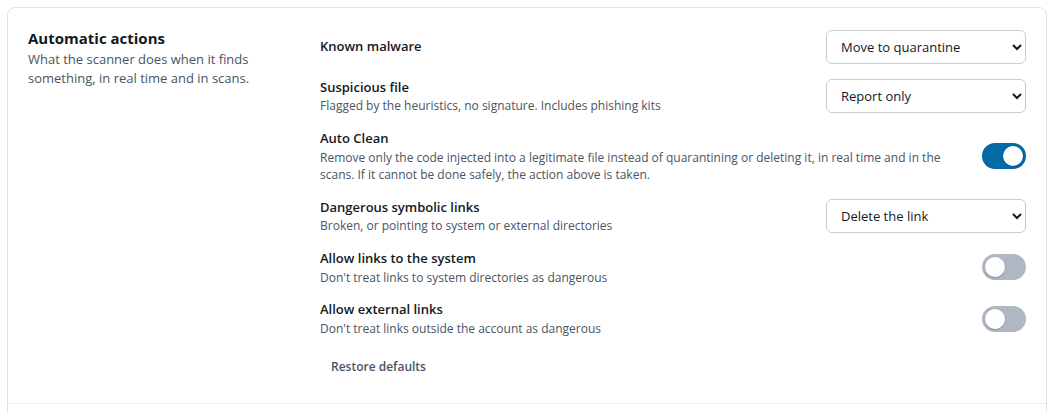
With Auto Clean off, you can still clean files by hand: detections that can be cleaned show Can be cleaned, and the Clean action in Detections shows what will be removed before doing it.
What a cleaned file looks like
In Detections, a cleaned file has the status Cleaned. Its detail shows the code that was removed, line by line, and the original file before the cleaning.
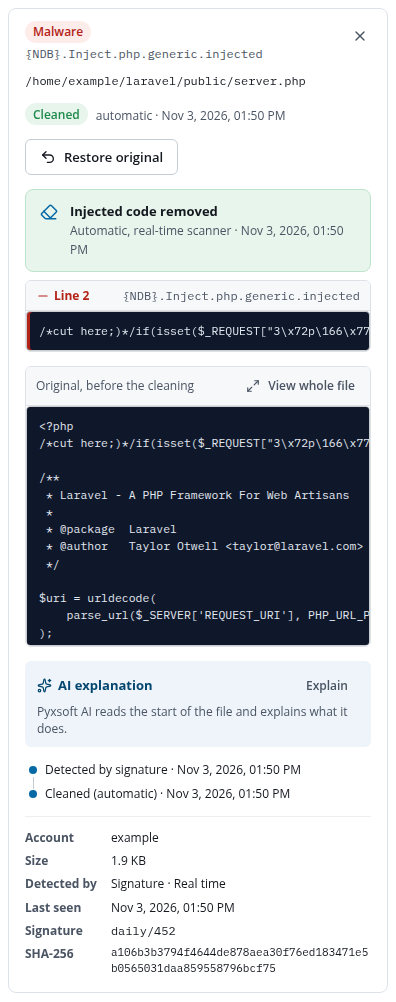
Restore original puts the file back as it was, with the injected code, and adds it to the allowlist so it is not cleaned again. Use it only if you checked the detection was a false positive: otherwise the injected code is active again.
When a file is not cleaned
Auto Clean only acts when the result is certain to be safe. It does not clean, and says why, when:
- The whole file is malware (nothing legitimate would be left), or the file is a decoy: a copy of a legitimate file that hides malware.
- The code of the file uses the injected code, so removing it could break the site.
- The file would still contain malware, or something suspicious would be left after the cleaning.
- The file is not PHP, is not a regular file, is too large, or changed since it was detected.
In those cases the malware action is applied, or, for a manual cleaning, nothing is changed and you can quarantine the file instead.
After a cleaning, check how the injection got there: an outdated plugin, a leaked password or a backdoor elsewhere in the account will bring it back.